- Definition of Graphic Design Examples
- The Use of Graphic Design
- Types of Graphic Design Examples
- Website Design Examples
- Graphic Design Portfolio Examples
- Good vs Bad Graphic Design Examples
- Common Graphic Design Mistakes
- Create Your Own Graphic Design Step by Step
- Tips to Identify High-Quality Graphic Design Examples
- Conclusion
We see graphic design examples everywhere almost every day. A lot of us don’t realize that there is more to graphic design than just beautiful visuals. The designs that get our attention in 0.05 seconds have purpose and structure.
That’s why 94% of first impressions are design-related. According to studies, 75% of users determine a brand’s credibility based on graphic designs. This means that if the design is unappealing, the users will abandon the website as well as the brand.
Design helps a brand communicate. It appeals; gains trust, engages, and keeps you memorable. This is possible when one chooses all the design elements wisely and applies them consistently.
In this guide, we will discuss graphic design examples to help beginners understand what strengthens or weakens a design. The aim of this blog is to educate them on why design is the best visual communication tool.
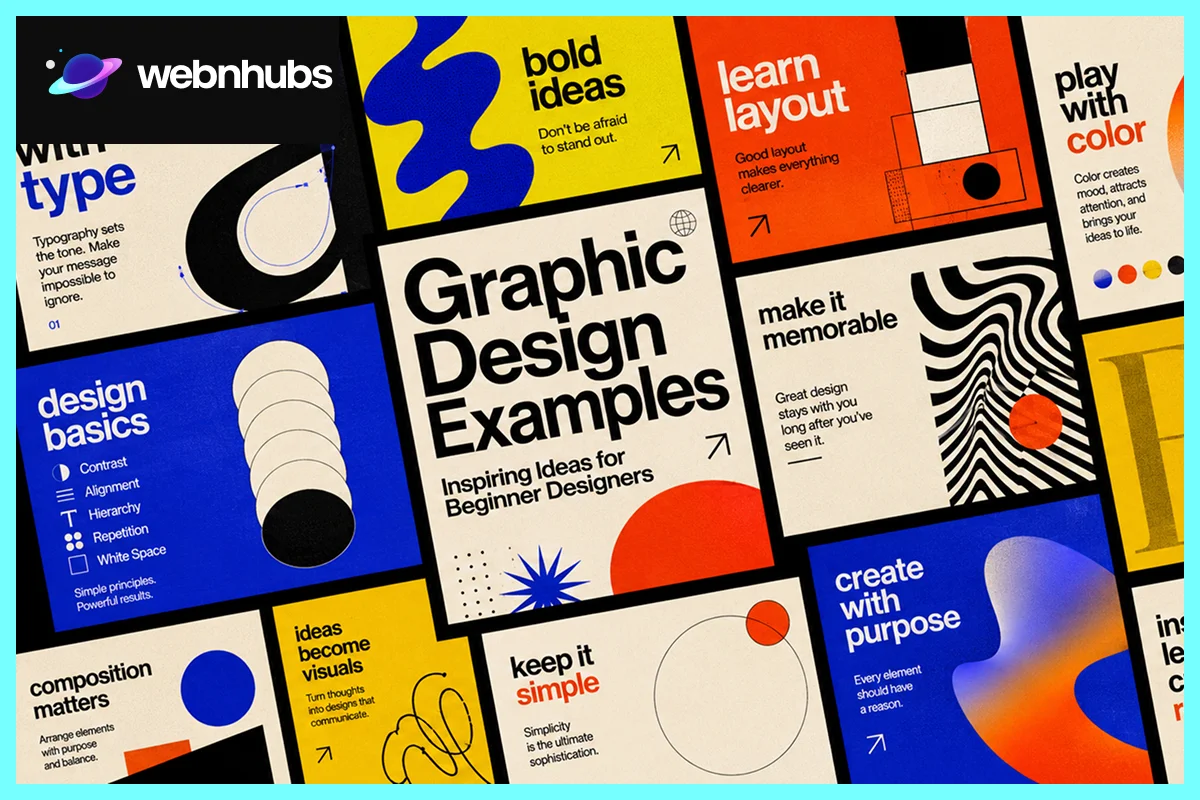
Definition of Graphic Design Examples

These refer to graphic design projects that stood out in the past and are still exemplary. They are for beginners to study and learn tips and tricks on how to effectively use color, typography, spacing, and layouts.
Every design has a purpose. They are either designed to convey a message, advertise a product, create a brand, or enhance the user experience. These graphic design examples are useful as they not only inspire but also educate beginners on how to structure designs.
The Use of Graphic Design

People now communicate through visuals. They no longer write but create a visual and share it on social platforms. The reason is the ability of designs to influence the brain. They attract, influence, and convey information.
You will find graphic designs everywhere on the internet and in the offline world. Since they are found everywhere, people must see the examples before designing one. With strong graphics, it is easy to engage, build trust, and make smart decisions.
Branding
Graphic design is used in many ways, commonly in branding. Be it a brand logo, a packaging material, colors, or fonts, every single design element contributes to a memorable visual identity.
A professional brand knows the importance of consistency in design. There is consistent use of color, layout, fonts, and style on business websites, ads, and marketing.
For example, think of a Coca-Cola and see how your brain thinks of red and white instantly. This is the power of consistent graphic design in efficient branding.
Many good graphic design examples in branding prioritize simplicity, as simple graphics are easier to remember and work across various platforms.
Websites
Graphic design plays a significant role in a website’s user experience. It makes it easy for visitors to browse pages easily, understand content quickly, and stay longer.
To enhance user experience, one must use useful layouts, clear typography, good spacing, and structured visuals. There are graphic design examples available that make it easy for their users to browse without overdoing sections or elements.
A perfectly designed website is navigable, comfortable to use, and looks good on any screen.
Advertising
You must have seen catchy ads that have stayed in your mind. Well, the magic behind a successful advertisement is a well-thought-out graphic design with a clear message.
Graphic designs in ads make people stop, look, stare, and remember. Whether it’s a banner or a social media post, visuals become a deciding factor for visitors to either stop or pass by.
The best ads do have catchy visuals and a clear message in bold fonts, but they never overpower designs.
If you want to learn how to design graphics for advertisements, there are graphic design advertising examples available. They take you through the journey within seconds and capture your attention for years to come.
Types of Graphic Design Examples

There are numerous types of graphic design, and each one has a distinctive function. Some help brands with recognition, while others connect and enhance user experience.
That’s why it is important for beginners to learn about different graphic design examples. It helps them understand how design shifts with audience, platform, and communication purpose.
Graphic designs are used for different purposes. They can be used for branding, advertising, storytelling, creativity, and digital interaction. The goal is to design according to the purpose to obtain fresh, memorable, or appealing outcomes.
Branding & Logo Design

Branding is a way to make the brand image memorable. Strong branding generally sounds easy, familiar, and consistent on all platforms.
It is often the first thing customers see on the packaging, website, or ads on social media.
Some of the best graphic design examples that you see around are successful because they are familiar and not overly detailed.
Minimal Logo Design

Simple logos are clear, rather complicated. They do not need fancy words or graphics to be familiar. Have you seen the logos of Apple and Nike?
The symbol of Apple is clean, the shapes are smooth, it looks modern and premium, while the swoosh of Nike is simple and has a lot of energy.
They are effective because people identify them, whether they are on websites, packaging, or billboards. This is the power of effective graphic design examples and why beginners should study them.
They explain that sometimes a simple design does better branding than a busy one.
Typography-Based Logo Design

Other brands use typography as their primary means of recognition. For example, the Google logo is font-based, it is simple, and the colors signal simplicity and accessibility.
When typography is used as a logo, the font is the logo. In such logos, details like letter spacing, curves, and thickness are the deciding factor whether the design looks professional or not.
These graphic design examples explain how typography alone can give personality to design without any symbols.
If used properly, typography logos can look timeless, readable, and instantly recognizable.
Luxury Brand Design

Look at the luxury brands like Chanel and Rolex; they do not use a lot of features but are simple. There is a smart use of white space, font pairing, and structured layout, which adds an elegant feel to their designs.
Beginners study these brands to understand how balanced typography, monochromatic color, interlocked C’s symbol, and custom sans-serif fonts make Chanel timeless. While the use of gold tones and elegant typography in Rolex projects conveys prestige and exclusivity.
There are plenty of other graphic design examples that explain how subtle and valuable details work best for luxury brands, especially if they want to grab massive and timeless attention.
Color-Focused Branding Design

Some brands are known for their colors, for example, the color red and yellow pairing of McDonald’s. There are other brands as well that are easily recalled because of their color palette. For example, the color green comes to mind when we look for Shopify.
Using colors consistently is as important as choosing the right color pairing. That’s how people recall brands within seconds, even before reading the brand name.
People link certain feelings and memories to colors, and you will see the strategic use of color palette in many graphic design examples.
By applying the same theme on different platforms, brands create a strong sense of connection and professionalism among their users.
Mascot Branding Design

It takes a lot of time and effort to design custom mascots, but they surely make brands look livelier and more unique. The reason is that mascots appeal to people more quickly than abstract symbols.
For example, Colonel Harland Sanders is an iconic identity of KFC. The logo has evolved, but the visual identity has always been Colone’s face. Another example is Duolingo’s unique mascot. It is a green owl, which is a hinged personality that represents knowledge and wisdom.
These graphic design examples explain how different styles, expressions, and personalities can impact brand engagement and conversions.
Website Design Examples

Website design is the fusion of style and function. Good websites provide users with information that is easy to obtain and understand.
Minimal Website Layout Examples

In such a layout, there is an important role of white space, typography, and colors. If you look at the minimalistic web designs, you will find limited use of color palette, simple fonts, and enough white space. This makes it easier to read and helps to maintain focus on key information.
Brands like Apple and Stripe are some of the best minimal graphic design website examples out there.
E-commerce Website Examples

Such websites focus more on product visibility and ease of navigation. When you look at e-commerce stores like Amazon and eBay, you will see how they have high-quality product shots, categorized product sections, and easy-to-navigate buttons, which all lead to better conversion rates.
Portfolio Website Examples

Lusion is an award-winning creative agency portfolio that showcases its work using 3D immersive visuals, fluid graphics, and fast-loading grids.
Your portfolio website should be easy to navigate with a flexible layout and good-quality images. This way, it is easy for designers to attract clients and demonstrate to them their creative abilities.
Clean vs Cluttered Webpage
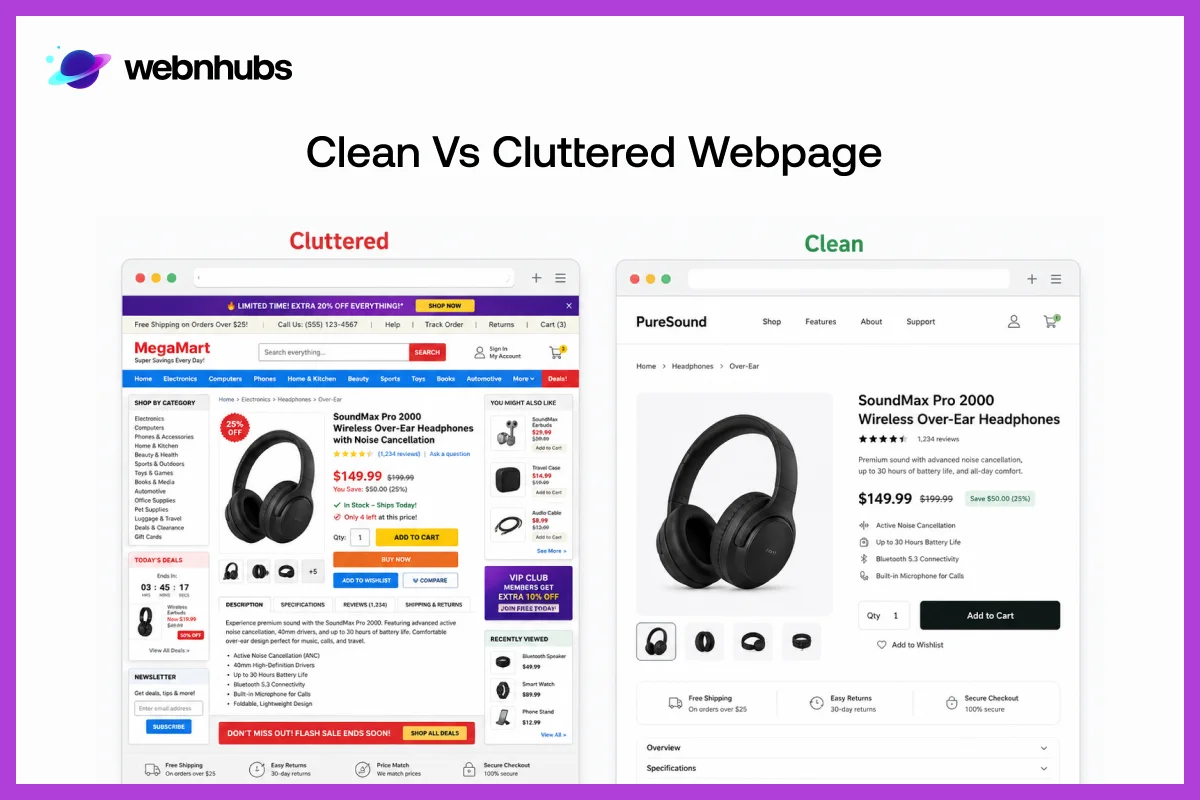
Clean websites help users go through webpages easily. The content feels easy to understand, the visuals look high-quality, and each design element complements the others.
Whereas, too many colors, fonts, and pop-ups overcrowd websites and frustrate users.
Mobile-Friendly Website Examples

The current trend is a mobile-friendly web layout, which means that the website must look good on small screens such as mobile phones.
According to recent statistics, 70+ users return to a website that is mobile-friendly.
Tired of Cluttered Designs That Confuse Your Audience?
Strong, clean graphics build trust and make your message clear without unnecessary distractions.
Graphic Design Portfolio Examples

Simple Portfolio Structure

The simple layout helps cut elements that are nothing but distractions. Most of the modern designers understand the power of minimal website designs. They use clean grids, large thumbnails, and focus on easy navigation to remain professional.
The famous designer, Jessica Walsh, prefers bold and organized designs to express her creative abilities. If you look at her graphic design portfolio website examples, you will see how her designs are not overwhelming.
There is proper use of white space, which adds breathing room, allowing users to easily read the design on any screen size.
Case Study Portfolio

In case study portfolios, the focus is on explaining the thinking process instead of the final design itself. Designers add all the visuals, fonts, colors, and even branding considerations to explain the evolution of ideas.
One of the best examples is the Behance case study portfolio, where designers explain every process step by step. This tip is now used by many upcoming professionals to produce more robust designs, allowing clients to see problem-solving skills rather than just pretty pictures.
Personal Branding Portfolio

In personal branding portfolios, designers focus on forming a connection to clients. They structure their portfolio based on creative personality, a voice of their own.
For beginners, Paula Scher’s personal branding portfolio is one of the best graphic design examples to study. She turns texts into cultural storytelling, focusing on providing brands with a bold and energetic feel.
A lot of graphic designers use the same approach to stay memorable. To make a personal branding portfolio, it is important to have a hierarchy instead of putting just a random collection of projects.
Interactive Portfolio
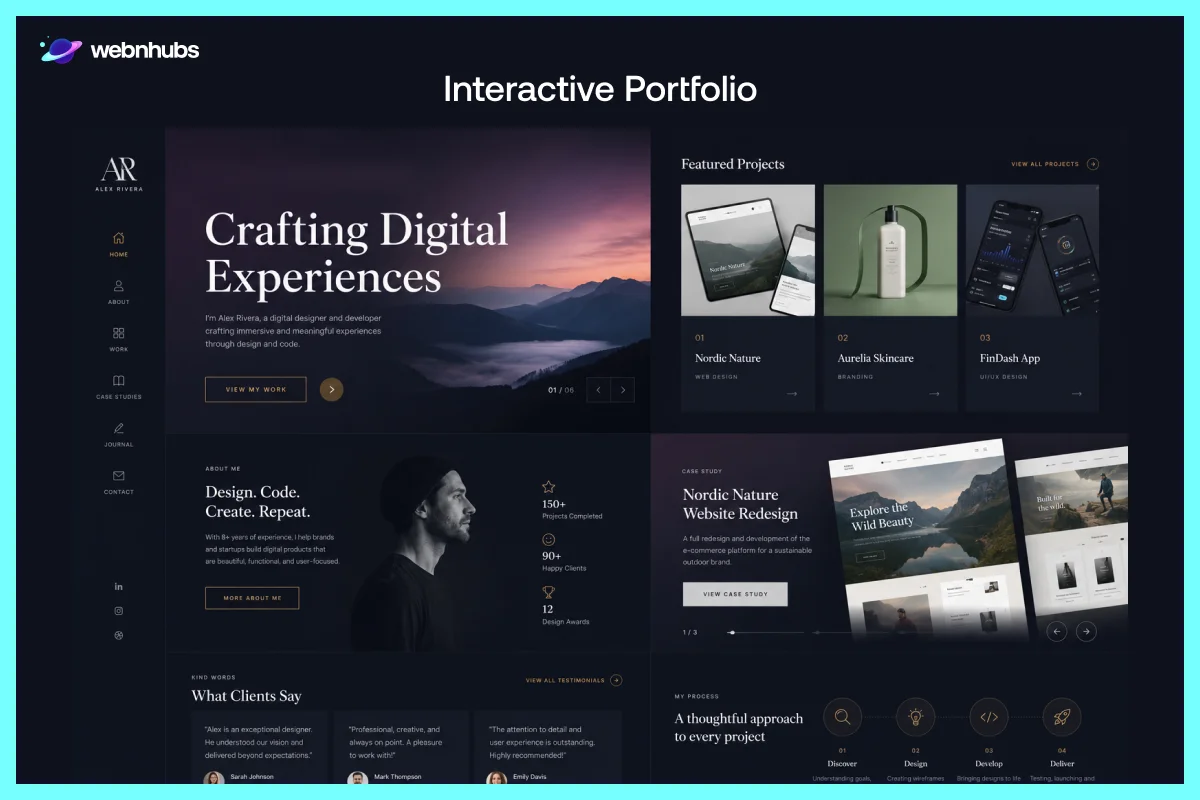
Movement and transitions create interactive portfolios. By using hover effects, animations, and adding smooth transitions, the designs become dynamic.
ToyFight-like designers add interactive elements into their designs in a creative way, but also make sure that the design is clean, easy, and engaging.
This is the best way to modernize a portfolio without shifting the focus away from actual work.
Beginner Portfolio

Rising portfolios don’t have to have well-known customers or dozens of projects in order to look professional.
Many student designers who have done well in the design field present redesign ideas, fictional branding projects, or student design work in a neat, thoughtful manner.
For beginners, it’s best to look for beginner-friendly graphic design examples. The ones that don’t overwhelm with too many details.
A portfolio with fewer pieces is likely to seem more professional than a crammed page.
Social Media Advertisement Portfolio

Users skim through content on social media and expect ads to grab their attention in the blink of an eye. Companies like Netflix use impactful graphics, big fonts, and very little text. This way, they get to promote within seconds.
The images must work well on smaller screens. For an advertisement portfolio, use designs with strong contrast and centered compositions. Remember, the best designs express one idea and leave out a lot of details.
Banner Advertisement Portfolio

With banner ads, hierarchy and readability are really important because viewers take seconds to look at them.
Have you seen Amazon banner ads? They use large headlines with bold CTA buttons to grab your attention.
Other graphic design examples for banners also use neat layouts to give users a clear idea of their offers. Also, balanced spacing and contrast naturally highlight the important information in the background.
Product Campaign Portfolio

For product campaigns, it is important to focus on a series of shots, branding fonts, and a unified visual tone.
Apple is a good example. In their campaigns, they use simple layouts, sleek product images, and brief messaging. This keeps the focus on the product only.
However, Nike’s campaigns focus on emotional energy. They use dramatic sports imagery and large, bold fonts to create energy around products.
These are other product graphic design examples available that stand out because every visual element is loyal to the same branding approach.
Event Promotion Poster Portfolio

For event promotion portfolios, add posters that are both appealing and informative. Have you seen Coachella event posters? They use layered fonts and vibrant colors to represent a catchy and energetic music festival vibe.
In event promotion posters, it is important to be creative and, for this, designers rely heavily on typography. Using useful fonts makes key information, such as dates, location, and the names of artists, easy to read.
Good poster layout points the way and leads the reader.
Email Marketing Design Portfolio

Good email marketing campaigns look neat and tidy and don’t have too much text for readers to read. For example, Airbnb’s promotional emails are clean and simple, which comes from simple typography and good spacing.
It is important to be consistent with the design elements. Be it color or style, consistency is important for better communication and brand awareness.
Remember, the most effective email designs are simple and easy to understand, even on mobile devices.
Illustration-Based Design Portfolio

Good visuals can make a brand or a publication look more original and human. For example, Dropbox uses custom-drawn, playful visuals in branding to make digital products more approachable and creative.
A lot of good graphic design examples use illustrations to add personality to designs. Also, this is only possible when they are customized instead of stock images.
Vintage Graphic Design Portfolio

The vintage graphic design is timeless and features retro typography, faded textures, and nostalgic colors. Clothing brands use vintage branding to convey familiarity and character.
The classic typography and old-style label design help make brands like Jack Daniel’s recognizable.
These are some of the graphic design examples that show how vintage designs can still work well with modern layouts and composition.
Good vs Bad Graphic Design Examples

The difference allows beginners to see what makes communication and usability better in design.
Design Element |
Good Graphic Design |
Bad Graphic Design |
| Simplicity | Clean layouts have only important information, are easier to understand.. | Designs with much text, icons, and effects look busy. They overwhelm users, making it difficult for them to understand anything. |
| Readability | Use of clean fonts and proper spacing so that the content is easy to read. For example, Medium, who uses simple typography and white space so that the readers read content smoothy. | The use of decorative fonts, varying text size, and small layouts make information hard to quickly scan. |
| Color Usage | There is consistent use of colors throughout the design. | Color schemes that do not match or are too random create a cluttered and distracting layout. |
| Layout Structure | It is organization in sections, which lead the viewer through information. | The sections are disorganized and hard to read, causing users to lose their sense of direction. |
| Visual Hierarchy | Headlines, pictures and supporting details are clearly arranged. | If all elements seem to be equally significant, the design appears disorganized and cluttered. |
| Spacing | Balanced spacing provides breathing space for content and adds a professional touch to designs. | Use of too many elements in too little space cause visual overload, making it difficult for users to understand anything. |
| Typography | A uniform typography gives a neat and tidy look. Google’s typography is clean, modern and easy to identify. | Too many font styles make it inconsistent and reduces the overall design quality. |
| User Experience | Navigation is smooth and information is readily available. | The design is complicated, difficult to navigate with too many things at once that are frustrating. |
Want Your Audience to Remember Your Brand Easily?
Make your content simple, readable, and impactful so viewers stay engaged and recall your brand.
Common Graphic Design Mistakes

Use of Too Many Design Elements
A lot of beginners try to fill in the empty area with text, graphics, or effects. This way, the designers end up with a cluttered design. Simple designs are in trend now, using less is always more, and it is enough to send your message across.
Using Too Many Fonts
Using more than one font style affects readability. The design feels difficult to look at and understand. This is one of the reasons why you will find simple and balanced typography in most of the great graphic design examples.
Ignoring Alignment
When the layout or the design structure is not aligned, it does not appeal to the user, even when the content is exceptional. Alignment is really important to keep the website design looking neat and professional.
Copying Without Understanding
Do not try to copy the ideas, but learn from them. When it comes to layout, typography, and color combinations, beginners should learn, experiment, and create something of their own.
Create Your Own Graphic Design Step by Step

You can’t just put the content, visuals, and everything else together and expect great outcomes. It is very important to have a proper guide in mind and a prior understanding.
A lot of designers start solid, but fail to focus on design structure and whether it communicates or not. This is where they fall hard and deep.
Remember, each design element has a purpose; only add those that align with your idea. This is one of the reasons why it is important to study professional graphic design examples because they help you understand how to use layout, typography, colors, and spacing in harmony.
Define the Purpose
The design must have a purpose, whether it informs, sells, or builds brand awareness. Make sure you design around that purpose and choose every design element around it. The viewers must find it easy to understand the message that you want to send.
Understand the Audience
Design for your target audience. If you are a fashion brand who aim to target youth, choose a bold and creative layout. For an audience in a corporate setting, pick clean and professional visuals.
Knowing everything about the target audience will help you choose the right color, font, tone, layout, and visuals.
Select a Color Palette
Color has the power to evoke emotions in people. In designs, bright colors give a more energetic look and feel, whereas softer colors are for a more professional and calmer look.
The use of powerful colors and using them consistently on all platforms enhances brand visibility.
Limit Color Usage
Loving colors is a good thing, but adding too many colors to the design will make it chaotic. In most of the graphic design examples, you will notice that the designers stick to a limited color palette.
It is very important to use a combination of two colors and stick to it for better design readability.
Select Typography
In a design, typography helps to add to its personality and readability. Depending on the font and style used, visuals can appear modern, playful, elegant, or professional.
Another benefit of using clear typography is that users can scan information more easily, which improves the communication process.
Pair Fonts Carefully
Too many fonts result in cluttered designs. Avoid using too many fonts; stick to two or three, and make sure they are used consistently.
Using fonts properly throughout the platforms and pairing them correctly is crucial for brand recognition.
Arrange the Layout
Choosing the right design layout is important as it helps arrange the information and allows users to read the design easily.
Good layouts provide structure to designs. There is a proper balance of visual elements that makes the design clean and appealing.
Use Visual Hierarchy
Visual hierarchy organizes design elements, guiding viewers on what to look at first. Headlines and buttons, visuals and supporting text should all be in clear order rather than competing head-to-head for attention.
Many graphic design examples work well due to the hierarchy, which creates an easier and quicker read through of information.
Review and Improve
Most of the time, creating a good design takes enough revisions, feedback, and improvement. It does not normally happen on the first take.
The professional designs you see on the internet took lots of testing, editing, and revisions. This adds clarity and balance in design.
It is important to review the designs carefully and look for weak spots. Remove any unnecessary detail that can exhaust designs.
Check Readability
Always test the design on different screen sizes. The text must be easy to read; there should be enough white space and clarity in design.
The colors and fonts must highlight the important details and not the other way around.
There are lots of graphic design examples available that can be enhanced with minor readability and alignment tweaks.
Tips to Identify High-Quality Graphic Design Examples

A good graphic design is natural and easy to follow and never heavy on the eyes. Anyone can recognize good design, even those who are not designers.
The difference between a good and a bad design example is that a good website design communicates and engages better than the other.
To make informed decisions, beginners must know the tips and tricks, which is possible only through studying graphic design examples.
Visual Hierarchy
A good graphic design will always be clear with natural visual hierarchy. The headlines will be bold, whereas the supporting text and everything else naturally follow it.
With hierarchy in designs, viewers know where to look and what to do next. Without it, everything competes for attention, which makes layouts quickly overpowering and hard to scan.
Consistency
Consistency creates a sense of unity and professionalism in designs. Text colors, typography, space, and visual styles should be consistent across the entire layout.
Graphic designs that do not make it to the list lack consistency, which makes users lose trust. Consistency is really important for a better brand’s visibility and a smooth user experience.
Readability
It is very important for designs to be readable, not just the text but the visuals as well. For this, not only font styles but also the layout, white space, and proper use of the grid are also important.
With poor spacing, visual contrast, and balance in design, the viewers find it painful to engage. The design must be readable on all platforms, and for this, optimization is really important.
Remember, it is proper spacing, balance, and contrast that keep the viewer engaged for longer.
Simplicity
Simple designs convey information far better than cluttered designs. To make functional designs, it is important to add what’s important and what can help deliver the message clearly, instead of just adding everything.
Many graphic design examples stand out in people’s minds because they are not trying too hard, but are well-structured and well-designed.
Conclusion
Every day, people of all ages come across brands, products, and information through graphic designs. Unlike normal people, designers and experts focus on details that make designs memorable and effective.
The details vary from design to design. Not all designs have the same purpose; every design has a different creative approach. But one thing is often clear when one looks at a design, which is whether it serves the purpose or not.
The first rule of design is that it is a skill that can only be achieved by watching and doing. The designers learn to create a good sense of design by analyzing the layout, typography, spacing, and color use of real projects over time.
The more you look at design, the more you will learn about the good and the bad ones.
Frequently Asked Questions
Graphic design examples are designer’s work that stand out in the past. These are images that we also see daily without realizing. They are readable, appealing, and make you take action.
These examples also help beginners with designing, letting them compare a good one and a bad one.
The beginners learn better when they are able to observe how design is used in the real context rather than just reading the rules of design. These examples help beginners understand layout, color, fonts, and the importance of visual hierarchy. Through graphic design examples, beginners learn to make better creative decisions over time.
It looks clean, balanced, and readable. Adding too many elements is never a wise choice, as it makes designs look unbalanced. A professional design will have a balanced use of colors and fonts. Every element will complement and work towards making the overall design look both premium and purposeful.
Because they try to achieve everything at once. Use a lot of colors, different fonts at once, too many effects or zero sense of spacing turn a design into a bunch of things with no purpose.
The design must serve the purpose. It must not be noisy but must be pleasant and lead people through the information naturally.
By simply looking for graphic design examples and making notes about them. Observe what you like and why you like it.
When starting out, it is important to learn the importance of each design element, instead of just trends or effects. The more you practice, the more you will start to develop strong design instincts.

Hafsa Hanif is a talented content writer at WebnHubs, specializing in topics such as graphic design, web design and development, logo design, and animation. With her deep understanding of design principles and creative processes, Hafsa crafts engaging, informative, and SEO-optimized content that resonates with readers. Her expertise in SEO ensures that her articles not only captivate audiences but also rank well on search engines, helping businesses boost their online presence through compelling design-focused narratives.
